
Now Meta can optimise for what you actually earn

Are you optimising for profit on Meta?
Without third-party tools, Meta has until now only been able to see what your customers spend. Not what you earn. That is about to change.
Meta has opened up the ability to pass profit data via the Conversions API and optimise ads accordingly. The feature is called value optimization for profit and builds on the value optimization I'm already a big fan of. Meta has not announced when it will be available to everyone, and we have yet to see it on our own accounts. I'm ready and waiting to test it.
Try seeing the difference for yourself below.
Which order would Meta prefer to get more of?
Illustrative example with fictional orders and margins, not customer data.
From purchase value to profit
Today, most Meta campaigns optimise for purchase value. The algorithm sees how much an order is worth in revenue, but not what you earn from it. A large order with a low margin therefore looks like a better customer than a smaller order with a high margin.
Once the setup is in place, you select Purchase as the conversion event at the ad set level and Profit as the value to optimise for. You track the results in Ads Manager by selecting the Purchase Profit column.
Value optimization
You send the purchase value
Meta can only see how large the basket is. A large order with a low margin therefore looks like your best customer.
Meta pursues revenueThe purchases with the largest basket
Value optimization for profit
You also send the profit
Now Meta can see what the order is worth to you. The smaller order with a high margin suddenly becomes the most interesting.
Meta pursues profitThe purchases that put the most money in the till
How to enable it in Ads Manager
- 1LevelAd set
- 2Conversion eventPurchase
- 3Optimise value forProfit
- 4Follow up in the columnProfit from purchases
How profit travels from your webshop to Meta
The technical approach is straightforward: the Purchase event receives an additional field, net_revenue, alongside the purchase value. Meta uses this as an optimisation signal.
You don't need to send your exact revenue figures. According to Meta, values may be normalised — for example, by multiplying or dividing by a fixed constant — as long as the relative profit ratio between orders is preserved.
01
Webshop
The order is stored with cost price
02
Profit is calculated
Added to
net_revenue03
Conversions API
Sent with the purchase in real time
04
Meta
Bids for profit, not just revenue
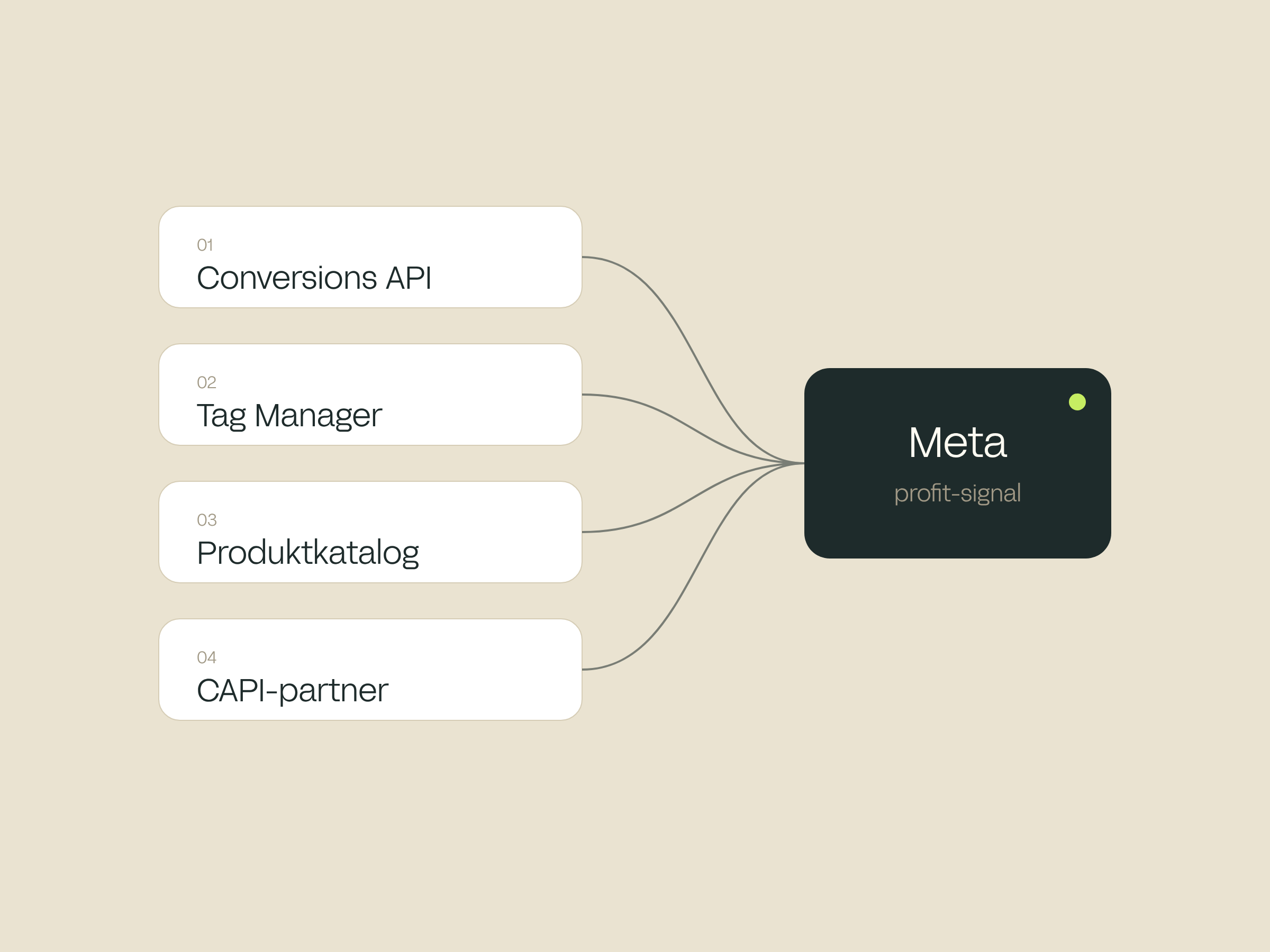
Four ways to send profit to Meta
Add net_revenue to the Purchase event in real time, alongside the purchase value.
Calculate the profit in a GTM variable and send it with the Purchase event to the Conversions API.
Enter estimated_margin per product in the catalogue feed. Requires Advantage+ catalog ads.
If you have an integration partner, they may be able to handle the setup for you.
What needs to be in place
Meta's documentation sets out a number of requirements before profit optimisation can run. The most important is volume: without enough conversions, the algorithm does not have sufficient data to distinguish between good and poor orders.
In addition, purchase events must be sent in real time and must not be delayed while the profit is being calculated.
Different positive profit values (at least 3)
Conversions per week as a minimum
Conversions per day per campaign (recommended)
Conversion location: website
The pitfall: a fixed percentage is not profit
Profit must genuinely vary in relation to purchase value. If you send the same share of the order value for every order, Meta receives exactly the same signal as before, and the result will be the same as standard value optimisation.
The value lies in the differences in margin. This requires control over the cost price per product or per order — for example from your webshop, ERP or feed — and the ability to pass that data through to your tracking.
Fixed percentage
All orders get 20 % as profit
- Sneakers240 kr.
- Jacket180 kr.
- Knitwear130 kr.
- Accessories80 kr.
The largest basket still gives the highest profit. Meta learns nothing new.
Actual profit
Each order gets its actual margin
- Sneakers96 kr.
- Jacket315 kr.
- Knitwear293 kr.
- Accessories80 kr.
The jacket beats sneakers on profit. That is the signal Meta needs.
Order valueProfitIllustrative example, not customer data
Do third-party tools still make sense?
When Meta itself can optimise for profit, it's natural to ask whether tools like Reaktion and ProfitMetrics are still needed.
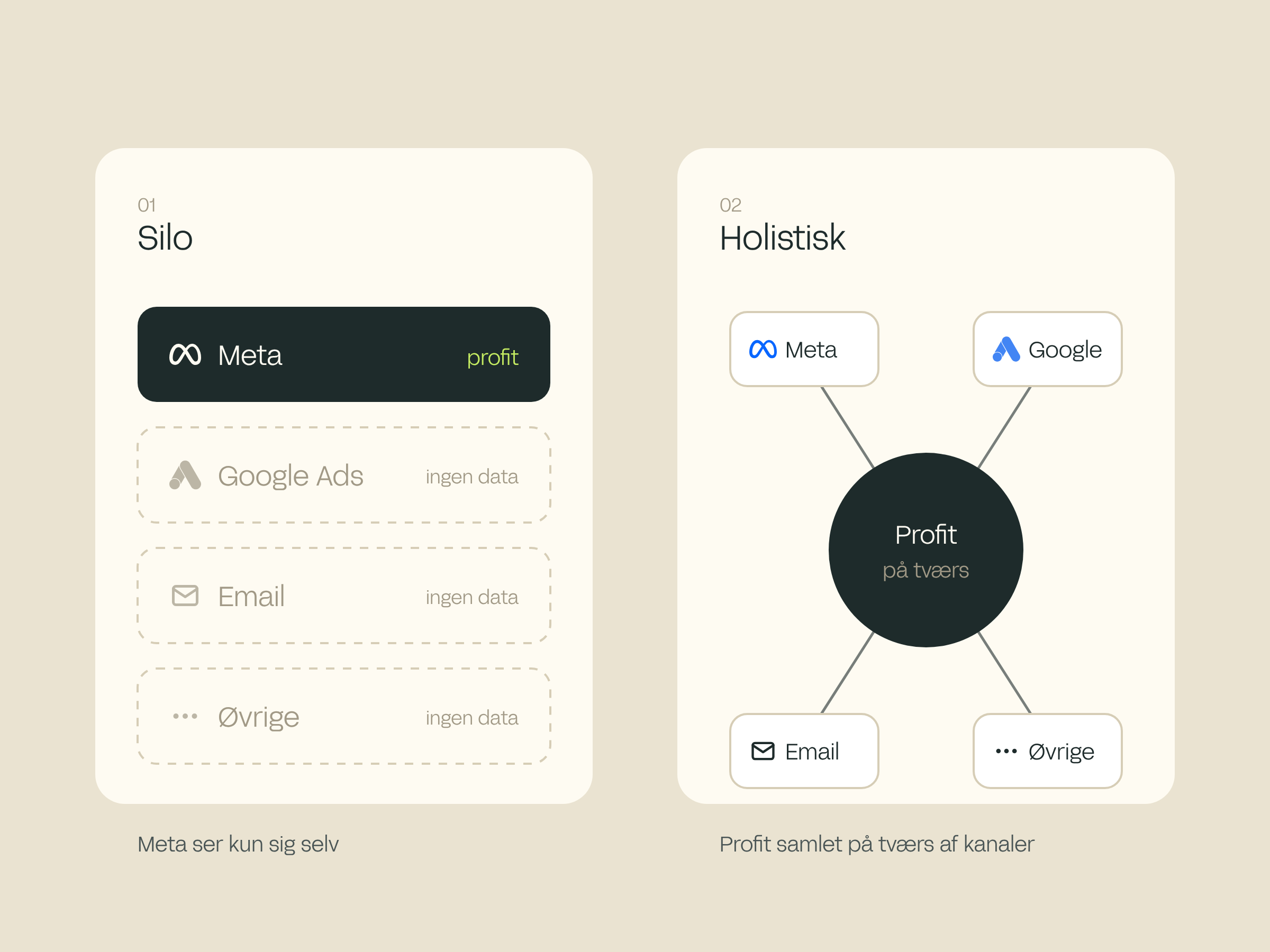
My answer is yes. In today's marketing landscape, reverting to silo-based optimisation would be a huge step backwards. Meta's profit optimisation only sees what happens within Meta.
The advantage of third-party tools is that you can both bid for profit and optimise value across your marketing channels — giving you a more holistic view of your business.
Going back to silo-based optimisation would be a huge step backwards. Bid for profit, but view the business as a whole.
Nanna Gøbel, Head of Paid Social
How to get started
You don't need to wait for the feature to land on your account. Most of the groundwork can be done now, so you're ready when it does.
Is your account ready to optimise for profit?
We review your tracking, your margin data and your Meta setup, and give you an honest assessment of whether you're ready to optimise for profit — and whether Meta's own solution or a third-party tool is the best fit for you.
Book a meeting
Let's have an honest talk about your business
We skip the big agency gestures and look at your real data instead — to see whether a collaboration would actually make sense.
- 30 minutes, no obligation. The meeting is free, and you commit to nothing.
- We start from your data. We look at where you are today, and where we see the biggest opportunities.
- Online or at our office. You choose — and you don't need to prepare anything.
Who will you talk to?
One of our advisors, who knows your channels and can give an honest picture of where the potential lies. No sales pitch — just a conversation about your opportunities.
How it works
- 1 Pick a time that suits you
- 2 Get a confirmation email with a link to the meeting
- 3 We meet and talk through your opportunities


