The three factors that make up Core Web Vitals
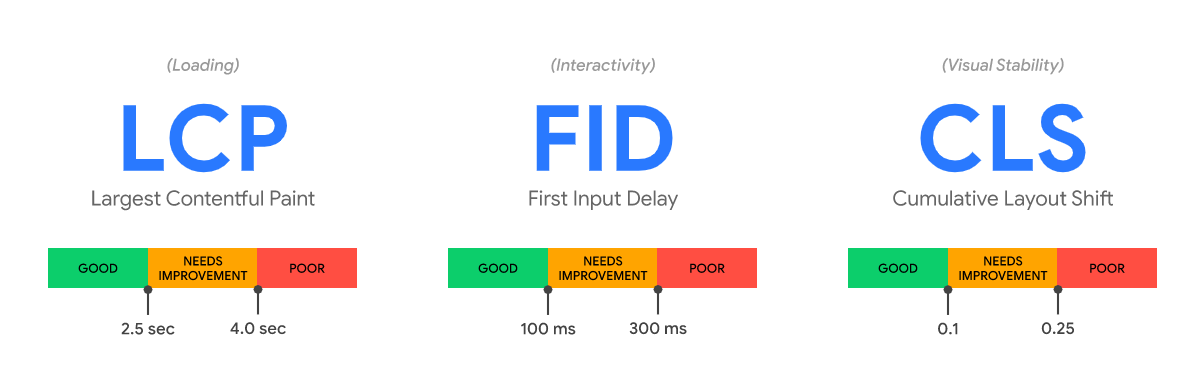
Core Web Vitals were divided into three different metrics: Largest Contentful Paint (LCP), First Input Delay (FID) and Cumulative Layout Shift (CLS).
In 2024, Google updated these areas to be Largest Contentful Paint (LCP), Interaction To Next Paint (INP) and Cumulative Layout Shift (CLS).
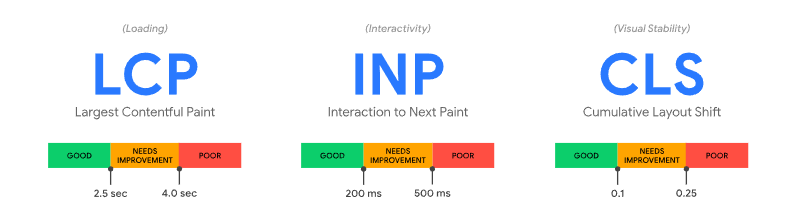
Largest Contentful Paint (LCP) is a measure of how quickly the primary content on a page loads before the user can interact with the page and its features.
Interaction To Next Paint (INP) is a measure of how quickly a page and its elements respond to user interactions. That is, how long it takes from, for example, a click until a visual update occurs on the page. The purpose of INP is to provide a realistic picture of how users experience a page's responsiveness, which is crucial for a good user experience and potentially better search engine rankings. To deliver the best possible user experience, Google's guidelines dictate that pages should have an INP of 200 milliseconds or less.
Cumulative Layout Shift (CLS) is a measure of how visually stable a page is while it loads. The more elements shift around on a page as it loads, the higher (and therefore worse) the CLS score.
How do you optimise Core Web Vitals?
There are many areas to address when it comes to optimising Core Web Vitals, and it can seem both overwhelming and complex in terms of how and where it is most appropriate to start.
Below we offer a few tips on how to optimise the three parameters.
1. How to improve your LCP score
Defer “non-critical” Javascript & CSS
One of the most common causes of a low LCP score is third-party scripts, as these reduce a page's response time. To avoid this, you should consider setting defer on scripts that are not critical to the website's functionality, or removing them entirely if they serve no purpose.
The same applies to CSS files. Here it is necessary to identify the critical CSS files, which can be done using this tool. The critical CSS files should then be placed above the fold, which is the part of a website that needs to load as quickly as possible.
Use a CDN
Using a Content Delivery Network (CDN) reduces the time between a user request and a server's response time. This is because a CDN distributes content to all devices, meaning content is always delivered from a server located close to the user making a request on a website.
Image optimisation
A straightforward way to improve your LCP score is by compressing the images used on a page. This makes it possible to avoid excessively large image formats. Another solution is to convert images to AVIF or WebP format, as recommended by Google, if the images are in JPEG or PNG format.
File compression
By compressing your HTML, CSS and Javascript files using GZIP or Brotli technologies, these files will load faster, thereby reducing response time between browser and server.
2. How to improve your INP score
To improve Interaction to Next Paint (INP), it is essential to reduce CPU processing on the relevant page and implement asynchronous code so that the user experience updates instantly. This involves a thorough review and optimisation of both first-party and third-party code to shorten response time:
- Use DevTools' "Performance" tab to investigate how elements load and identify potential delays.
- Reduce background loading to cut down on Input Delay by deferring the loading of third-party scripts until after a user action.
Effective INP optimisation requires a holistic approach that encompasses both first-party and third-party code, as well as a strategic approach to JavaScript processing and UI updates, to ensure an optimal user experience.
Lazy loading of images
Using lazy loading, it is possible to defer the display of images that are not shown until the user scrolls further down the website. This was previously a factor in the FID score – but remains relevant for INP and the speed of a page.
Removing unused Javascript
Removing unused Javascript files improves load time and therefore the opportunity for interaction on a page. The easiest way to find unused Javascript is by using Google's own tool PageSpeed Insights.
Minimise DOM size
Use, for example, content-visibility in CSS to lazy load elements that are off-screen in the viewport.
Minifying Javascript
By minifying all Javascript files, all comments, line breaks and spaces are removed from the code. This results in reduced file sizes and therefore faster loading times.
3. How to improve your CLS score
Specify height and width for images and videos
A common and fixable CLS issue in PageSpeed Insights is the absence of width and height attributes for media files. By defining these attributes, the browser reserves exact space for the elements, which prevents content from shifting during loading and thus improves page stability.
Ads and iFrames
The same applies to ads, iFrames and other embeds on the page. By ensuring that these have reserved space by specifying width and height, the CLS score will improve.
Preloading fonts
By prioritising the preloading of fonts, the browser is instructed to prioritise and load the fonts early, ensuring that the web font is visible when the page loads.
What are your next steps?
You now understand the significance of Core Web Vitals and the opportunities to improve your website's performance. User experience is crucial – both for your visitors and for Google – and will affect your website's Google ranking going forward.
However, it is important to remember that Core Web Vitals are just one of many ranking factors. Just because your Page Experience is good does not mean your page will immediately climb to the top of search engines. Start by ensuring your content is interesting and relevant. Then you can begin optimising Core Web Vitals.
Take the step with Searchmind
Does your website need a performance boost, and do you want to ensure your visitors get the best possible experience? Then contact us today for a no-obligation conversation about how we can help you get the most out of your website.


