What is CSS and what does it stand for?
CSS stands for "Cascading Style Sheet" and is a coding language used in web development.
What is CSS used for?
CSS is used to style HTML elements — in other words, to change the appearance of the HTML code on your website. HTML and CSS therefore very often go hand in hand, and if you write HTML code without styling it with CSS, it will quickly end up looking like something from before the turn of the millennium.
How does CSS work?
In practical terms, CSS works by using CSS selectors (this is where you choose the HTML element(s) to be targeted by the CSS rules) to define various styling rules for those elements.
Following your CSS selector, you open and close using curly brackets " { } ".
Each CSS rule ends with a semicolon " ; ".
The most commonly used CSS selectors are classes and IDs.
To reference a class in CSS, a period " . " is placed before the class name. IDs are referenced by placing " # " before the ID name.
For example, if you have the HTML element <div class="test"></div> that you want to reference in your CSS code, you would create the following CSS selector:
.test {
CSS rules are written here.
}
Example of CSS code
A concrete example of CSS code can be seen below. To make it more meaningful, there is also some accompanying HTML code, since it is precisely HTML elements that are styled using CSS.
HTML code
<div class="container">
<a href="#">Button 1</a>
<a href="#">Button 2</a>
</div>
CSS code
.container {
display: table-cell;
height: 100px;
border: 1px solid black;
padding: 10px;
position: relative;
vertical-align: middle;
}
.buttons-container {
display:inline-block;
position:relative;
}
.container a {
display: inline-block;
background: green;
color: #fff;
text-decoration: none;
padding: 5px 10px;
}
Appearance before CSS code
Here it is simply the default styling rules — which vary from browser to browser — that dictate how the relevant HTML elements should look.

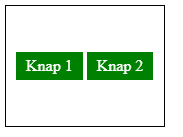
Appearance after CSS code
After adding our CSS code, the result looks quite different:
How do you create a CSS file?
It is actually very easy to create a CSS file. Simply create a file and make sure it ends with the extension ".css".
Would you like to learn how to use CSS to improve your website's design, or do you need help optimising your site's layout and user experience? We can help you implement CSS in a way that ensures a modern and user-friendly design. Fill in the form below or call us on 30 12 42 72 for a no-obligation chat!


