What is a referral exclusion?
A referral exclusion is a feature in the tracking tool Google Analytics. By setting up referral exclusions, you can exclude domains from your referral reports in Google Analytics.
In other words; the reports where you can see which websites visitors used to access your domain.
Why should you set up referral exclusions?
In 9 out of 10 cases, you need to set up referral exclusions to exclude payment gateways from your referral reports.
If you have not set up referral exclusions for your payment gateways, you risk them taking credit for a conversion that should in reality be attributed to a different source/domain.
The reason for this is that certain payment gateways redirect users to a different domain during payment, and then send the user back to your website. When this happens, Google Analytics will think the user found your website through the payment gateway and attribute the purchase to the payment gateway's domain.
A concrete example of how missing referral exclusions can corrupt your data
A typical example of a customer journey where missing referral exclusions can corrupt your data might look like the following:
- A user accesses your website through one of your Google Ads advertisements.
- The user browses your website, finds the product they want and goes to the cart to make a purchase.
- The user selects MobilePay as the payment method and is redirected to the domain "public.mobilepay.dk" to complete the payment.
- After payment is completed, the user is sent back to your domain on your "Thank you for your order" page.
- Google Analytics attributes "public.mobilepay.dk" as the traffic source for the purchase.
In the above case, this purchase will therefore be incorrectly attributed as referral traffic from the domain "public.mobilepay.dk", despite the fact that it was actually one of your Google Ads advertisements that generated the purchase.
How do you set up referral exclusions?
To set up referral exclusions in your Google Analytics account, the process is as follows:
1. Determine which domains need to be excluded
First and foremost, you need to determine which domains require referral exclusions in your Google Analytics account. These vary depending on which payment gateways you use in your webshop.
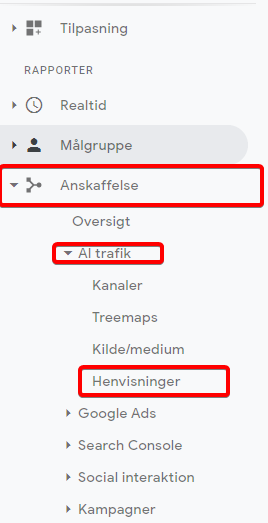
You can find this out by going into Google Analytics and selecting "Referrals" under "Acquisition" -> "All Traffic":
You will then be presented on the right-hand side with the Google Analytics report for referral traffic to your website:
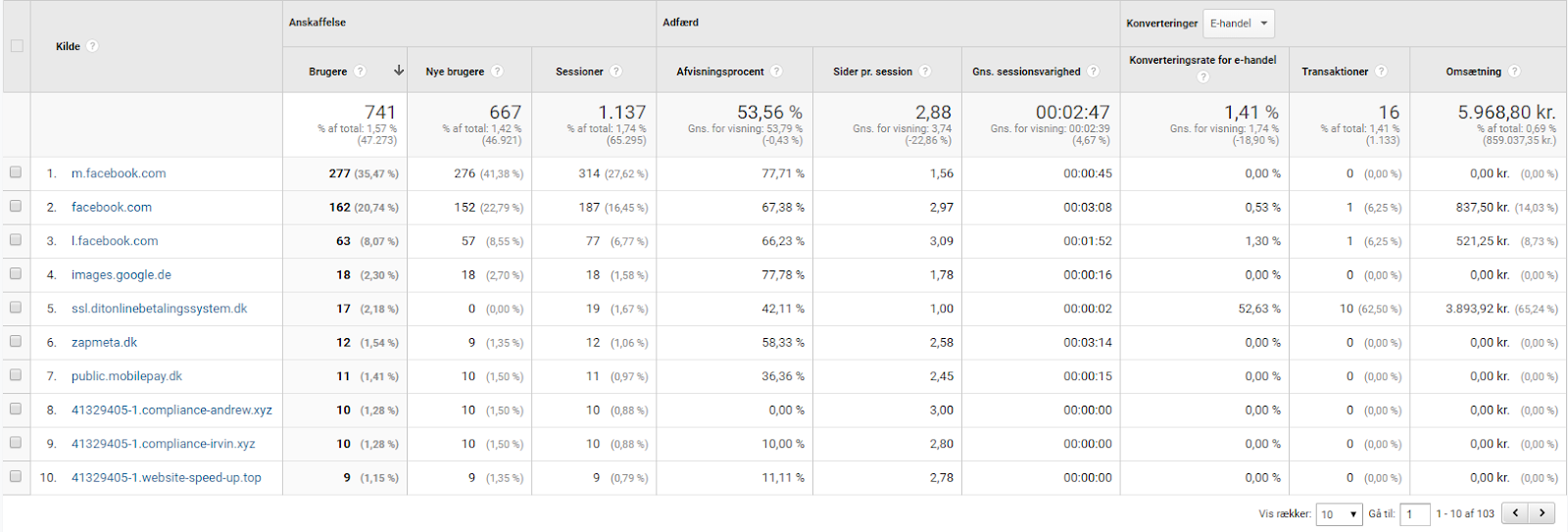
Here you should look under the "Source" column for domains that appear to be payment gateways. In the above example, these are for instance the domains "public.mobilepay.dk" and "ssl.ditonlinebetalingssystem.dk".
Write these down on a list, for example in Word or Notepad, and save it.
2. Add the domains to your referral exclusions
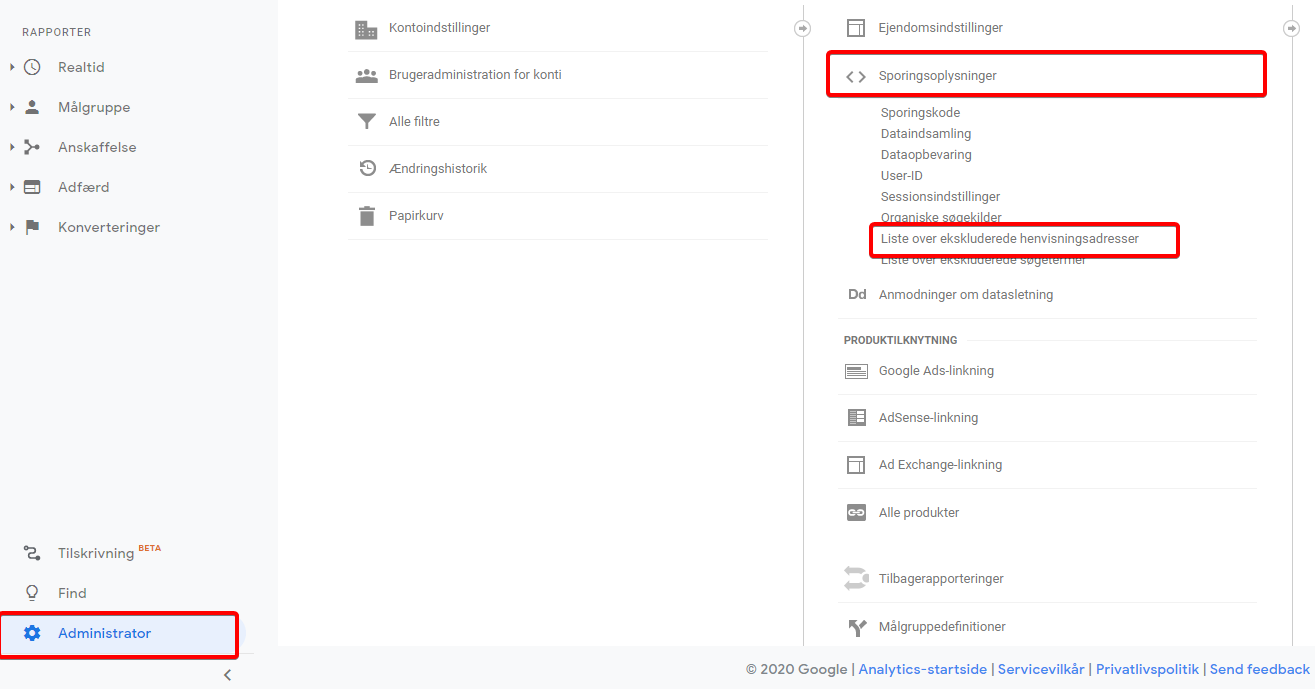
After you have determined which domains need to be excluded from referrals, you need to add these domains to your referral exclusions. This is also done in Google Analytics under "Settings" -> "Tracking Info" -> "Referral Exclusion List":
Here you click the red button labelled "Add referral exclusion":
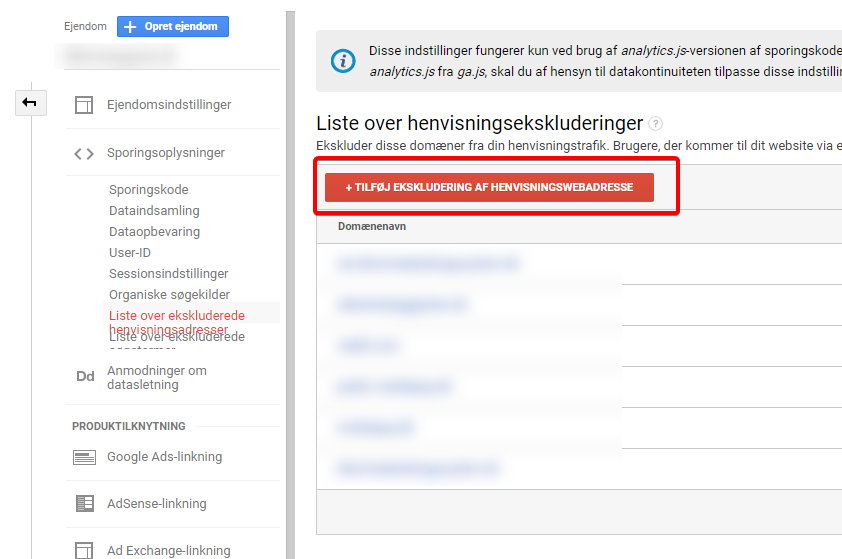
In the input field that then appears, add the first domain on your list and click "Create".
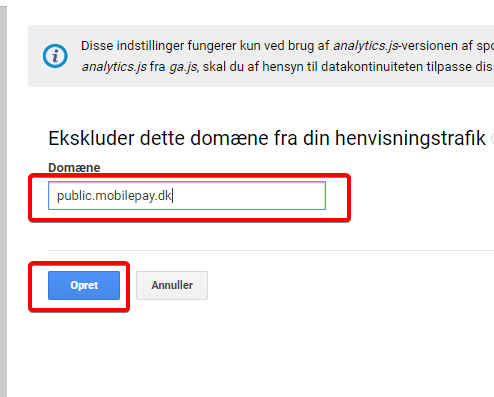
Do the same for the remaining domains on your list, and voilà — you have now set up referral exclusions and will begin seeing more accurate data in your Google Analytics reports.
It is important to note that your newly configured referral exclusions unfortunately do not work retroactively, and you will therefore continue to see payment gateways in reports containing data from before you set up the referral exclusions.
Are you unsure how to set up referral exclusions in Google Analytics?
Fill in the form below, or call us on 30 12 42 72 to get help optimising your tracking data!


