What is Google Disavow Tool?
Google's Disavow Tool is a tool used through Google Search Console to reject selected backlinks that point to your website.
The reason you may want to reject links through the Disavow Tool is typically a suspicion that certain backlinks could have a negative impact on your website's ranking in search engines.
For example, you may have been the target of a link attack, or you may have previously used Black Hat SEO methods to acquire backlinks that have turned out to negatively affect your website's ranking.
What does Disavow mean?
Disavow means to reject responsibility and association.
When talking about disavowing links, the word itself implies that you want to reject responsibility and association with certain links pointing to your website.
Which links should you disavow?
The Google Disavow Tool should only be used to reject links that may have a negative impact on your website's ranking in search engines. When you disavow links directly with Google through their Disavow Tool, the selected links will no longer have any impact (positive or negative) on your results in Google's search results.
This also means that if you accidentally disavow links that are positively affecting your website's ranking in search engines, it can have the opposite of the desired effect: your website may drop in rankings.
You should therefore only disavow backlinks that may negatively affect your ranking in search engines. Harmful backlinks can include:
- Links from hacked websites
- Links from websites with offensive content or content you don't want to be associated with
- Links placed with the intent of conducting negative SEO against your website.
- Spam links
You can identify which links to disavow by reviewing the backlinks pointing to your website. These can be found using tools such as: Google Search Console, Ahrefs, SEMRush, and others.
How do you reject links with Google Disavow Tool?
Here is how to disavow backlinks through Google Disavow Tool:
- Create a list of all the backlinks/domains linking to your website using Google Search Console and optionally third-party tools such as Ahrefs and similar.
- Review the list for harmful backlinks.
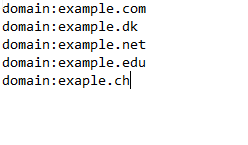
- Create a TXT file containing the domains you want to disavow, for example using Notepad.
- Domains should be listed as follows: domain:example.com in the file:
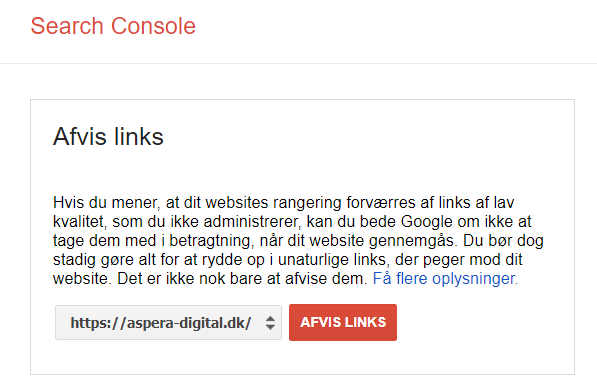
- Upload the file through the Disavow Tool in Google Search Console. Found here: https://www.google.com/webmasters/tools/disavow-links-main
- Monitor and keep track of changes in your search engine rankings.
You can also find Google's own help on disavowing links here: https://support.google.com/webmasters/answer/2648487?hl=da
Are you unsure whether you should disavow certain backlinks?
Fill in the form below, or call us on 30 12 42 72 for professional advice on your link profile and SEO strategy!


